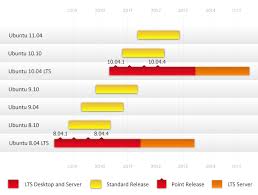
In the presentation in Barcelona, developer of Linux, Scott James Remnant revealed that the time booting Linux is reduced from 65 seconds at the 8.10 version of Linux, to just 25 seconds in Ubuntu 9.04. Canonical, vendor behind Ubuntu, will continue to add improvised time booting in Ubuntu 9:10 with the code name Karmic Koala. According to the claim Remnant, time booting Ubuntu 10.04 will changed to 10 seconds only, immediately following the release of Karmic.
Remnant information to give at the time which podići akan reduced. An important strategy to make Xorg display server running as soon as possible, so that will give you a short time for the components that must be placed before the start Xorg, including components udev device manager and initramfs, a temporary system files that are loaded to memory to facilitate syetm pross startup. Initramfs while acting as responsible for mounting the root file system and load the kernel module. In addition, the initramfs also play a role for software RAID, encryption disk, booting from the network file system, and perform other similar tasks. Remnant will reduce the time to reveal the performance of the two components above and eliminate some activities that can slow the startup.
Remnant says that the kernel and initramfs akan take 2 seconds, loading the drivers, mounting filesystems, and other load will took 2 seconds, launching Xorg display about 2 seconds and 4 seconds for the desktop environment and launching other services that are part of the user session . Computers will full load and is ready for use within 10 seconds, add Remnant.
Friday, 12 June 2009
How fast Ubuntu 10.04 will booting in 10 seconds !!
Monday, 11 May 2009
Tips : How to convert flv to 3gp in Ubuntu
If you have a flv video format in your computer and want to convert it to 3gp so you can play this video in your cellphone, you can go to this tutorial step by step:
first you need ffmpeg, but in ubuntu it needs more some libraries to complete it. Try this command in your terminal :
sudo apt-get install ffmpeg
then add this command after it :
sudo aptitude install libavcodec-unstripped-51 libavdevice-unstripped-52 libavformat-unstripped-52 libavutil-unstripped-49 libpostproc-unstripped-51 libswscale-unstripped-0
After this installation complete, then you can use it to convert by this command :
ffmpeg -i fileInput.flv -s 176×144 -vcodec h263 -r 25 -b 200 -ab 64 -acodec mp3 -ac 1 -ar 8000 fileOutput.3gp
NB:
1. -i means input and -o is output, you can see the configuration of resolution in this file
2. change the fileInput and fileOutput to the name of your target and destination file
Tuesday, 28 April 2009
Upgrade Ubuntu Offline
When i use ubuntu in my office. I have some problem with my establish connection. Sometime the Internet connection down, so i must restart again when download something from Internet. This case was happen when i want to upgrade my ubuntu 8.10 to 9.04. To solve this problem i googling how to upgrade ubuntu without connection. So i find the solution. This is step to upgrade ubuntu offline via ISO than you can do with any version of ubuntu.
- First you must have an alternate ISO file of ubuntu any version. Alternate Iso is different with Desktop ISO. I want to upgrade to ubuntu 9.04, so i must have Ubuntu Alternate 9.04 IDO file. You can dowload it here.
- Then you must mount it in cdrom with this command :
- After that you run this command as root
- Then it will show upgrade window and you can go configure it easily.
sudo mount -o loop ~/Desktop/ubuntu-9.04-alternate-i386.iso /media/cdrom0
gksu "sh /cdrom/cdromupgrade"

What is very different in Jaunty?? I think, it many change in look feel in it interface. It more attractive and nice color.
Tuesday, 21 April 2009
NEW Ubuntu 9.04 Jaunty Jackalope Features
Some time ago, I finished downloading Ubuntu 9:04 which is still in alpha release. Ubuntu 9:04 release version has the features:
- GNOME 2:26
- X. Org server 1.6
- New style for notifications and notification preferences
- Boot performance
- Linux kernel 2.6.28
- Ext4 filesystem support
- Cloud computing
- Turn-key mail servers
A new application that I see is a kind of cc cleaner on windows. When I tried Ubuntu live mode in 9:04, running Jaunty smoothly, sweet and without constraints. Advised, in my PC does not have hardware that requires a special driver, do not use ati or nvidia drivers let alone other.
Tuesday, 31 March 2009
Glade3 and PyGTK in Ubuntu
Something new in my programming vocabulary is python language. This language natively work in Linux, but as if you know, this language is multi cross platform. It can be run in Windows, Mac, Symbian, n others. First I use gedit as editor to run this script, but it is more advantage if i can use a nice RAD for python. After googling and an advice from my friend, I found good RAD is Glade-3. You can install it in your ubuntu with this command :
sudo apt-get install glade-3
then you can run this software and get this window :

Wednesday, 25 March 2009
Google Chrome in Ubuntu 8.10

This browser's status is still the name of Pre alpha browser Chromium, an open source engine behind Google Chrome project. Chromium for Linux have facilities-based interface GTS (mediator) and the appearance of work such as the Windows interface.
Because the status is still pre Alpha, chromium for linux this does not have many features that are important such as a bookmark manager, tab, and not in the trial and may not be functioning at all, but the PPA provides instructions to install.
Here some description from Launcpad.net
Ubuntu daily builds of the Chromium browser.
The PPA is maintained by a bot, so it contains completely untested builds, mostly useful to track regressions or if you are curious, or just brave.The package is still a work-in-progress, so is Chromium, please be patient.
FAQ:
* no native 64bit debs planed for now. The amd64 package is using ia32-libs.
* if it crashes, you can get a proper backtrace from gdb by installing the -dbg packageProject page for Chromium in Ubuntu: https:/
/launchpad. net/chromium- project
To add your sources.list, just add this command and update its.
deb http://ppa.launchpad.net/chromium-daily/ppa/ubuntu jaunty main
deb-src http://ppa.launchpad.net/chromium-daily/ppa/ubuntu jaunty main
Cool New Wave Theme for Your Ubuntu
Sometimes when we deal with many code in Ubuntu, need some refreshing in interface of window. It is not doubtfully if your an expert programming it is not meaning you like some eye-catching in your desktop. We can configure our Gnome theme with a nice and professional theme just like NEW WAVE theme. I love so much this theme, because have a clear look, simple and clean theme. This is some screen shoot from my PC.

I have read in Ubuntu 9.04 will included this theme as stock default theme. But if you want to download and install it, you can take it here http://linux.softpedia.com/get/Desktop-Environment/Themes/New-Wave-40415.shtml. And install in the appearance window.
Monday, 23 March 2009
UNETBOOTIN - best installation ubuntu in flashdisk / harddisk

Some days ago I have trouble in one PC which old and never use again. Actually, this PC have many feature in there when its time, but now this PC have a significant troubleshooting. I don't know maybe because some file system corrupt, so I could not booting Windows XP from this PC. The other problem is CD Player in this PC was damaged. So no option for installing new fresh Windows. I think I will make it for Ubuntu 8.10. When searching from live CD, I see an application "Make USB Startupdisk" an try it with my flash disk. Before that I try to install it in my Hard Disk External, but I don't know why, it can not read my HD. So I install it in my flashdisk. Than i try in my PC, but it seem not workin, there an error "Missing System Operation", so I try with another flash disk (coz i think maybe there some corrupt file).
But here i know something in internet, there are many bug in this application, so I try another alternatif. In ubuntu document explain another application called UNetbootin. I try to install it, and ta da.. it recognize my HD, and when I try to install in the trouble PC, it can startup and easily booting. So i can install my ubuntu. Oh there another feature in this application, you can install with an iso from another linux distribution, or you can also use option download directly from distro server.
So if you want to install your ubuntu (or other distro) in your hard disk or flash disk, I suggest you need UNetbootin to used. You can download it from this URL http://unetbootin.sourceforge.net/
Tuesday, 4 November 2008
Linux Vs Windows = Obama Vs Biden
 It's really america.. whit its power to attractive all billion people in the world with its news about election, hmm.. I think, its absorb in there too. There amazing similarity in this election with my theme is now i have to think back to choose where is my Default Operating System. Why I think like that?? Its because yesterday, my boss give me a task to make a software for some weather station in provinces. There some criteria that include in this software, that is ability to running in their OS, and whats is the bad news?? It is they use windows for OS.. So as beginner programmer, I have to learn again about programming in windows.. Let's go to Visual Basic.. Oh this tool have a huge growing, totally it's truth I have forget all about them.. Why i am go for this far?? Actually I love visual basic then another language, because its give a simplicity programming. More than Java, Python, and other, or in Big View we can see there similarity between Windows and Linux.It could say where do you choose simplicity or advence. Some times I just go want to open my laptop and do something easy..
 There is so similarity between US Citizen too choose who is their leader. Mc Cain with his simplicity to keep US same like years a go.. or Obama with many his opinion to change US and the world and give some extra work. But today US Citizen will give his voice where is the way that they choose. I think I have to choose to Windows or My Ubuntu.
Thursday, 23 October 2008
How To Install Google Earth in Ubuntu
 Google Earth is one of famous free apllication that help people in GIS. You can view some information of data base georeference or just only view of surface region.
This is definition of Google Earth in Wikipedia :
Google Earth is a virtual globe program that was originally called Earth Viewer, and was created by Keyhole, Inc, a company acquired by Google in 2004. It maps the earth by the superimposition of images obtained from satellite imagery, aerial photography and GIS 3D globe. It is available under three different licenses: Google Earth, a free version with limited functionality; Google Earth Plus ($20 per year), which includes additional features; and Google Earth Pro ($400 per year), which is intended for commercial use.[1]
The product, renamed Google Earth in 2006, is currently available for use on personal computers running Microsoft Windows 2000, XP, or Vista, Mac OS X 10.3.9 and above, Linux (released on June 12, 2006), and FreeBSD. Google Earth is also available as a browser plugin (released on June 2, 2008) for Firefox, IE6, or IE7. In addition to releasing an updated Keyhole based client, Google also added the imagery from the Earth database to their web based mapping software. The release of Google Earth in mid 2006 to the public caused a more than tenfold increase in media coverage on virtual globes between 2006 and 2007,[2] driving public interest in geospatial technologies and applications.
Now how to install Google Earth in our Ubuntu. Just tpe this command in Terminal :
wget http://dl.google.com/earth/client/current/GoogleEarthLinux.bin ; chmod +x GoogleEarthLinux.bin ; sudo ./GoogleEarthLinux.binFriday, 10 October 2008
Ubuntu Exhibition of free culture quits

It is a return to the fields of audio and video from the Ubuntu Community Council elected. A preselection had already been chosen by a jury composed of Cory Kontras, Luis de Bethencourt, Luke Yelavich, Lydia Pintsch and Tony Whitmore, has been taken.
Andres Vidau Andrew Higginson
Have won:
* Andres Vidau with Legs of cloth) (dl audio
* Andrew Higginson Stop Motion with Ubuntu) (dl in the area of video
Of course, both works well in the future Ubuntu facilities to enjoy, because all the CDs Intrepid are attached. All other entries are on the side of the free culture Ubuntu Showcase (s) as shortcuts to find.
Ubuntu NETBOOK Remix in the Acer Aspire One install

After several attempts, Ubuntu Hardy Heron in an external USB CD-ROM, I have to install (after the announcement by Sebastian), with the installation Netboot tries to PXE. The ubuntuusers.de there is a good How. On the contrary it DHCP server, I used udhcpd (I have on the server to Gentoo). In the settings you must write:
siaddr 192.168.0.150
Neptune SName
BOOT_FILE / pxelinux.0
The siaddr is the address of the TFTP server. When booting over the network (F12 express at boot time!) Gets the Aspire One NETBOOK then the installation files only from a TFTP server, and then from the Internet. The issue Prima!
In order after the successful installation of Ubuntu NETBOOK remix to install, you can also follow the instructions on ubuntuusers.de. Sound and wireless work with me more now I'm not yet. I am rich in fact, most of a terminal and Firefox
Monday, 28 July 2008
BIBLETIME – DO YOU LIKE READING BIBLE ?
Sometime you will very hungry of your soul if you forget about God words. As your body, your soul need feeds too.
Bible is not only a book of morality or history, it is a book where some people write it an contain truly God speak. Human is a creature, so he begin from zero, he don't have any knowledge know act that he brings before he birth. So he don't know actually what is event before and after he live. But in bible we learn more about our creature and about lives, don't that is the most object that we search in this world???.
Ok, let's back to the bible, how if it bring to digital archive. In past time, our evangelist write bible in papyrus or paper word by word and distribute them by foot. Now bible have write in digital so we can easy to distribute it and take to anywhere. That is make bible lost some find of it mean?? I think maybe yes, because if read from digital compare from paper, I think better read from paper. But it doesn't mean digital bible is worse. An application of digital bible archiving is Bible Time.
You can choose your bible with your prefer language that you like from its library. First you must download it. Unfortunately there is not Indonesian Bible (Alkitab) in its library. I hope someday there will be able.
But don't get sad for Indonesian because in this library have a dictionary that can translate from Indonesian word to English.
The feature that I like from this application is search option. Like some priest that easily find some reference from bible about a theme, we also can get where we will be find a keyword that related in bible. Such as, if we want to find “family” word in KJV bible, than it will search and get 76 hits.
ALBUM SHAPER – ARCHIEVE YOUR JOURNEY
I love traveling, and of course I love photographic too. Event I have go to somewhere awesome, going for some reason job or only for refreshing, I like to documentation my visited place, such as Jogjakarta, Bandar Lampung, Bali, Central Borneo, Bandung, Semarang, etc..
After I get home and transfer my journey photo in my laptop, I just put it in one folder every session journey. Rather that, I rarely to open it again or fix all my photos. How to fix my photo, I think is very waste some time in use GIMP, because as you know, to open GIMP need more memory. After that I have search an application in ADD/REMOVE APPLICATION, then I found Album Shaper application.
I try to use this software to manage every journey documentation. First to use this application, you must install it from accessories list in ADD/REMOVE APPLICATION, just search in keyword “Album Shaper”, than you can use it.
You must initial your album from album name, description, author, collection name, and its description. You can put a photo as cover album. Then search your folder where you put your photos so the software will get them.
If you have not familiar with this application, you can go to help menu, there will be a simple tutorial to use this application.
As I said before, you can fix your photos with this application. Choose “edit” tab in above your photos list. You can change the photo with some feature that use full. Those feature are :
- Rotating & Flipping
- Batch Effect
- Tilt Correction
- Cropping
- Enhancing your photo
- Color Correction
- Contrast Correction
- Red Eye Removal
- Histogram Editing, Brightness and Contrast
- Grain Enhancement
- Stylize your photo as emboss it, etc.
After finish your editing, you can save your album. There are some template to use your album. Just choose that you like, then it will make some file and folder to put your album.

There are still some feature to make your album can publish in internet that call export as web gallery, or you just let the file so it can opened in internet browser

Monday, 14 July 2008
SYSINFO – SHOW INFO ABOUT YOUR COMPUTER
Application that show you basic information about your computer simply is Sysinfo. This utility is simple information to understand performance of your computer from Hardware to Software and another info.
First information is about your system. It will tell you what is your Operation System, version and its kernel.
Then it will tell you the CPU specification : name, frequencies, and L2 cache
It also tell you memory and swap percentage uses of your computer.
Want to know the name vendor and capacity of your storage? It can tell you too.
Some info about your hardware include Motherboard, Graphic Card, Sound Card, and Network specification
If you have NVIDIA or ATI graphic card, it will show you some setting about this graphic card.
SAMBA – HOW TO SHARE FILES WITH ANOTHER COMPUTER
When you connect in a LAN, you may want share your file with another PC in your network. There a different system disk between Linux and Windows. Windows actually use NTFS or FAT, Linux use SDA or SHA. So there will a crash when your friend from another PC with Windows OS while he download your file in Linux OS. When we use Windows, easily we can share our file with right click file than choose “share this file/folder”. But in Linux you must share your file with a toll called SAMBA. This utility can you install in ADD/REMOVE APPLICATION than type “samba” in Find box then install it.
To share your file and can see from Windows in another PC, open SAMBA application, then click “add share” than browse your file. Give some description, and you can make this file could be written by another user in network, or just make it visible.
You can also make some privilege for your file, with add user that can access your file in access bar. Type user that you want to access it.
NEVERPUTT – CHALLENGE FOR MINIGOLF GAME
If you boring with task that given to you, you can play game for a moment. In my Ubuntu, one of my favorite game is Neverputt. This game is simulation for minigolf with OpenGL. To install it you doesn't require a emulator like WINE or CEDEGA. Just go to ADD/REMOVE APPLICATION, then type to find box “neverputt”, than apply it.
When you first play this game, it will begin menu PLAY, OPTIONS, and EXIT. Let it set default, just click PLAY
Then you have to choose level that challenge for you. There three option : EASY, MIDLLE, HARD. Than you must choose many player, if you want to battle with computer choose 1 Player.
You will play from easy field in this level, you must defeat the computer, he have make some step to put ball in hole (computer name is PAR, in right side corner). You must make step more few to win this game.
After one field finished, you will go to next field until 16 field. To win this game make sure you have total score more few than computer.
To move your ball you must set direction and strange of shoot with move your cursor to right and left or to up and down. I can print screen when this game play, it will be pause, to make play again just press SPACE key. Enjoy it..
MIRAGE – SIMPLE PICTURE EDITOR FOR LINUX
When you use Windows there a simple software name Microsoft Picture Manager that you can use to edit your picture or photo. Mirage is same software like that. Not like GIMP as picture editor for professional, this software is best choose to easy and fast edit photo like cropping, edit brightness/saturation, resize and make a thumbnail. But this software is not bundling with Ubuntu when you first install it. You must go to ADD/REMOVE APPLICATION, just type “mirage” in find box, than install it.
The most feature that we usually use is :
1. Change Brightness / Saturation
2. Resize picture
3. Cropping image as we like
4. Make a thumbnail from image, in default it will make thumbnail with JPEG format and 150x150px size. To change it just go to edit-->configure than edit command for make thumbnail with size that you like.
So there some better feature Mirage from Microsoft Picture Manage. Mirage can make thumbnail action with size optional. But mirage not provide more setting for brightness and set picture as wallpaper.
AVANT WINDOW NAVIGATOR – NICE LOOK BAR FOR LINUX
Avant window navigator is a eye candy tool for Linux that use to place some shortcut. This tool like bar but with some feature that make me like to see.
There many action move that we can see when a shortcut hover by mouse, or opened, or closed. There action of shortcut is :
1. classic
2. fade
3. spotlight
4. zoom
5. squish
6. 3d turn
7. 3d spotlight turn
8. glow
9. custom (to alternate every action)
If you want to install this tool, the easy way is you can go to ADD/REMOVE APLLICATION, then write in find box “avant”, then will appears the list and check it (make sure you choose “all available application”) then click APPLY.
If you want to launch this tool, you can choose in menu-->application-->avant window navigator, or you can type it in run box with keyword “avant-window-navigator”. If the bar not appear, you must first check the desktop effect is provide 3d in menu preference-->appearance
Then you can make setting in your bar with right click than choose preference. The preference window will opened. Than you can choose the action of shortcut that you like.
To make bar look 3D (not flat) just go to “bar appearance” tab, then choose “3D Look” in look option.
This tool will only appears if you click its shortcut in menu bar, to make it default show when you first open your Ubuntu, go to preference-->session than click “add” then type “avant-window-navigator”
Friday, 11 July 2008
Ubuntu Christian Edition for Indonesia
Talking about Christianity in IT world, I think seem going to wild world, that is a positive side and many negative side. You must to choose, like a life that must making decision in every action. Just simply case, when we go surfing, there many site that poison us, not only from image that shown, also from the arguments that we read. In this world, every individual can write every single that he wants. From how to make some bad things to how to pirates another creation.
When the first time you make decision what you prefer Operation System, Original or some pirate OS. Actually, me too early prefer to make pirates OS (win***s). Someday I read a man that said "the smart OS is OS that make user smart", and he is a foundation open source in Indonesia. Then I start to try learning Linux as my OS. When first time I use Ubuntu 7.04, there are many difficult to install it in my laptop, I think I will back to my early OS. Just like that in your life, people prefer to choose back to early habit/life because they surrender to make some change in their life. Because good habit more difficult to do, then just back to enjoy early habits.
Back to OS prefer, I have use ubuntu now as my operation system in my laptop. Then I read an edition that provide for christian, that called Ubuntu Christian Edition, this edition is not build from canonical, but build by a group IT specialist that bring christianity in their distro.
As they said in their web, there some add program bundling to help you learn about bible and christianity, and some tool to use when we surfing in internet. Along with the standard Ubuntu applications, Ubuntu Christian Edition includes the best available Christian software. The latest release contains GnomeSword, BibleMemorizer, the e-Sword Installer with Module Manager, The Word Installer, Firefox Web Browser with Bible Fox Theme and the WhatWouldJesusDownload Toolbar, and much more.
But as a citizen of Indonesia, that have mother language Indonesian, to use some software like GnomeSword or BibleMemorizer not very efisien, because I don't see my language bible in their library. I hope someday there will be a person can add Alkitab (read: bible), so I can more easily learn in my ubuntu.
If you want to choose this ubuntu edition, you can download HERE
 My name is Andersen Panjaitan, I hope this blog could be helpfull even a bit for you, and really nice if we can exchange link


